Shopify B2B: The Complete Guide to Companies, Catalogs, Terms and Checkout
Shopify B2B lets one store sell to consumers and to businesses at the same time: each wholesale buyer signs in, sees their own catalog and prices, and checks out on payment terms instead of paying up front. The idea is simple. The details are not — and most of the trouble merchants run into comes from details that Shopify’s Help Center spreads across a dozen pages, or doesn’t spell out at all.
This guide puts the whole model in one place: how Shopify structures your wholesale customers, how it decides which price a buyer sees, how payment terms and checkout behave, how sales staff fit in, and — at every step — what your plan actually allows. Where we have tested a behaviour on a real store and it differs from what you would expect, we say so.
It is also the starting point of our Shopify B2B Guide series. Each section below has a deep-dive article; the list at the end grows as they are published.
Who can use Shopify B2B
Shopify B2B is available on the Basic, Grow, Advanced and Plus plans. It is not available on Starter or Retail.
Two requirements catch people early:
- New customer accounts are mandatory. B2B buyers can’t use legacy customer accounts. Buyers sign in with their email and a one-time code — there is no password to manage.
- A B2B buyer is a customer linked to a company location. Any customer who is not linked to one is treated as an ordinary consumer (D2C) and sees your regular store.
Most of B2B works on every eligible plan. A handful of features — direct catalogs per company, deposits, unlimited catalog assignments — are Plus only. We flag each one as we go, and summarise them in a table near the end.
The data model: companies, locations and contacts
Everything in Shopify B2B hangs off three objects.
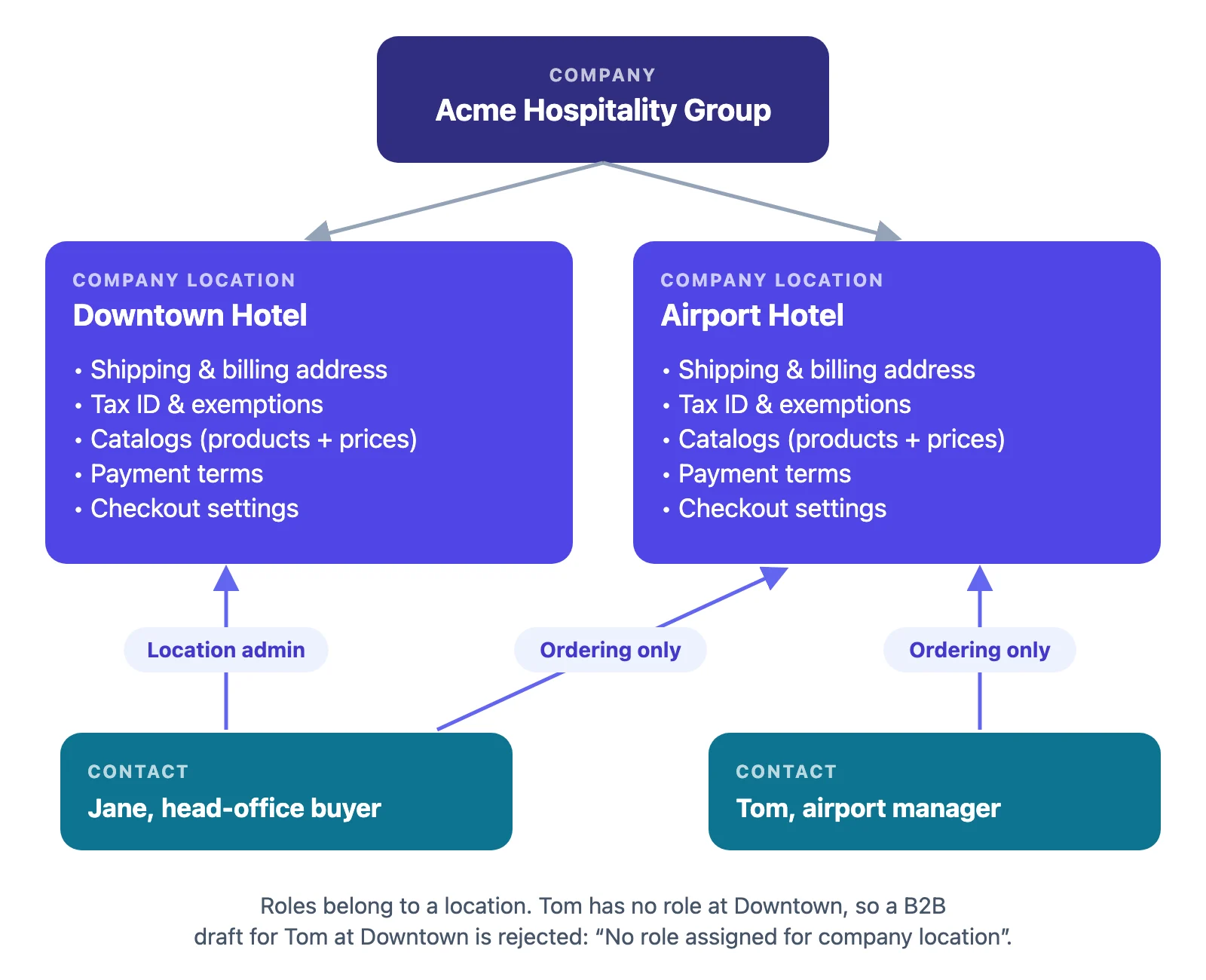
Company. The business you sell to — “Acme Hospitality Group”. It is a parent; on its own it doesn’t buy anything.
Company location. The place that actually orders: “Acme — Downtown Hotel”, “Acme — Airport Hotel”. This is the most important object in the model, because almost every B2B setting lives here:
- shipping and billing address
- tax ID and tax exemptions
- catalogs (which products, at what price)
- payment terms
- checkout settings (whether orders need your approval, whether the buyer may change the ship-to)
- the contacts allowed to order for it
A company with one site has one location. A company with twelve branches that each pay their own invoices should have twelve locations — not one location with twelve addresses.
Contact. A customer who buys on behalf of a company. A contact is linked to one or more of the company’s locations, and at each location holds a role:
- Location admin — can order, and can manage the location’s details from their customer account (for example, its addresses).
- Ordering only — can place orders, nothing more.
What actually happens: roles are per location
A contact’s role is attached to a specific location, not to the company. If a contact holds a role at the Downtown location only and someone creates a B2B draft order for them at the Airport location, Shopify rejects it with “No role assigned for company location”. We hit this repeatedly on test stores: when a buyer orders for several sites, give them a role at each site.
Two more habits save trouble later:
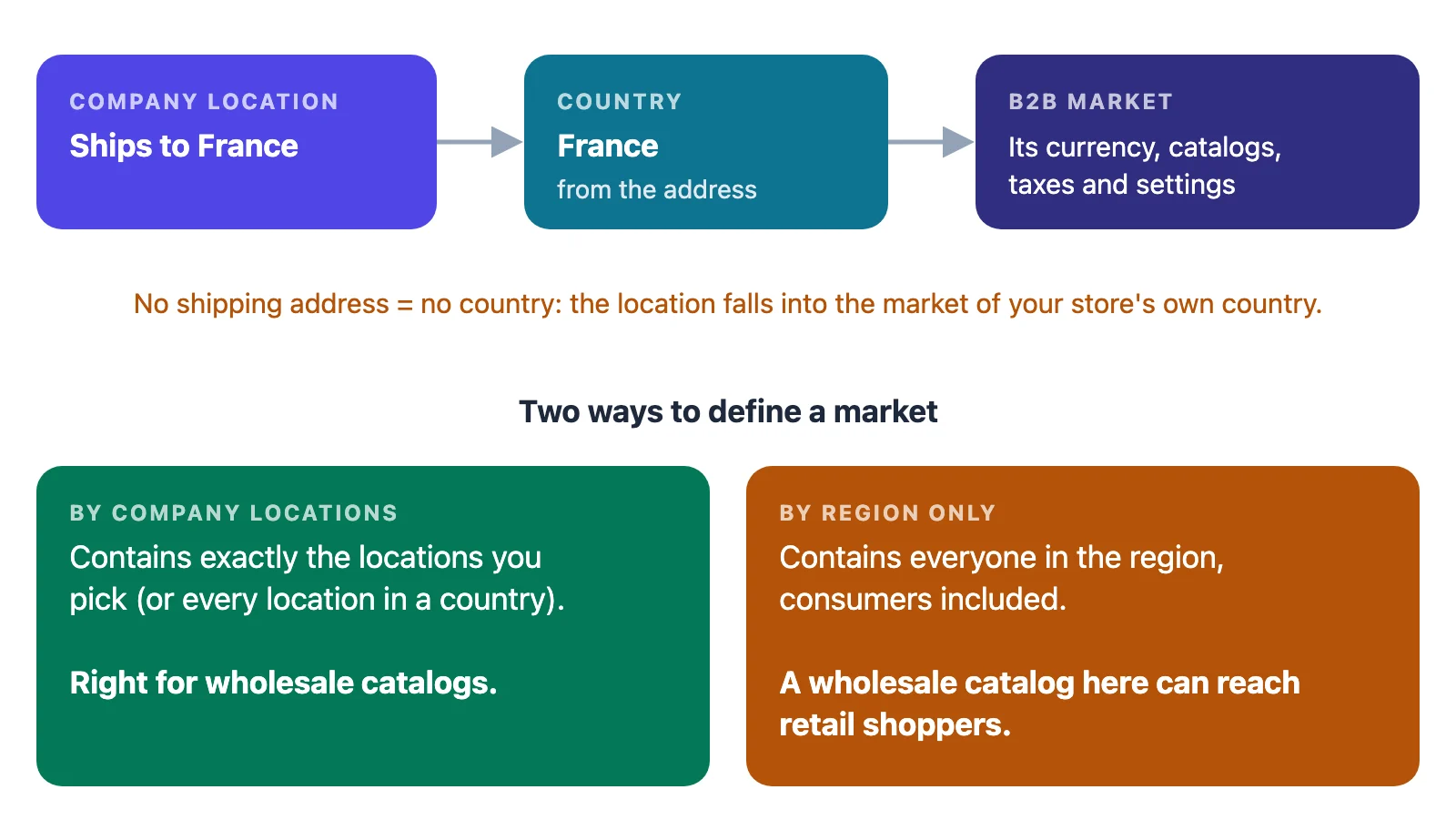
- Give every location a shipping address. A location’s country drives which market — and so which currency and catalogs — applies to it. A location with no address has no country, so Shopify puts it in the market for your store’s own country — with that market’s currency and catalogs, not the ones meant for where the buyer really is.
- Use the location name your team will recognise on a packing slip or an invoice. Buyers with several locations must pick one before they add anything to their cart, and they pick by name.
Catalogs and price lists: how Shopify picks a price
A catalog decides which products a B2B buyer can see and what they pay. It combines two things:
- a product list — include everything, or only selected products and collections
- a price list — a percentage adjustment on your regular prices (for example −30%), fixed prices per variant, or both. A fixed price always overrides the percentage for that variant.
Quantity rules (minimum, maximum, increments) and volume price breaks also live in catalogs, and they are available on every B2B plan. See quantity rules and volume pricing.
Where a catalog is assigned
| Assigned to | Applies to | Plans |
|---|---|---|
| A B2B market | every company location the market’s conditions match | Basic, Grow, Advanced, Plus |
| A company or company location directly | that company or location only | Plus only |
| A region market | everyone in the region — consumers included | all plans |
On Basic, Grow and Advanced, per-customer pricing therefore runs through B2B markets: you create a market whose condition is a set of company locations, and assign the catalog to the market.
When several catalogs apply
A location can be covered by more than one catalog. Shopify resolves it in this order:
- A catalog assigned directly to the location wins over any market catalog.
- Among market catalogs, the more specific market wins.
- If two catalogs are equally specific, the lower price applies.
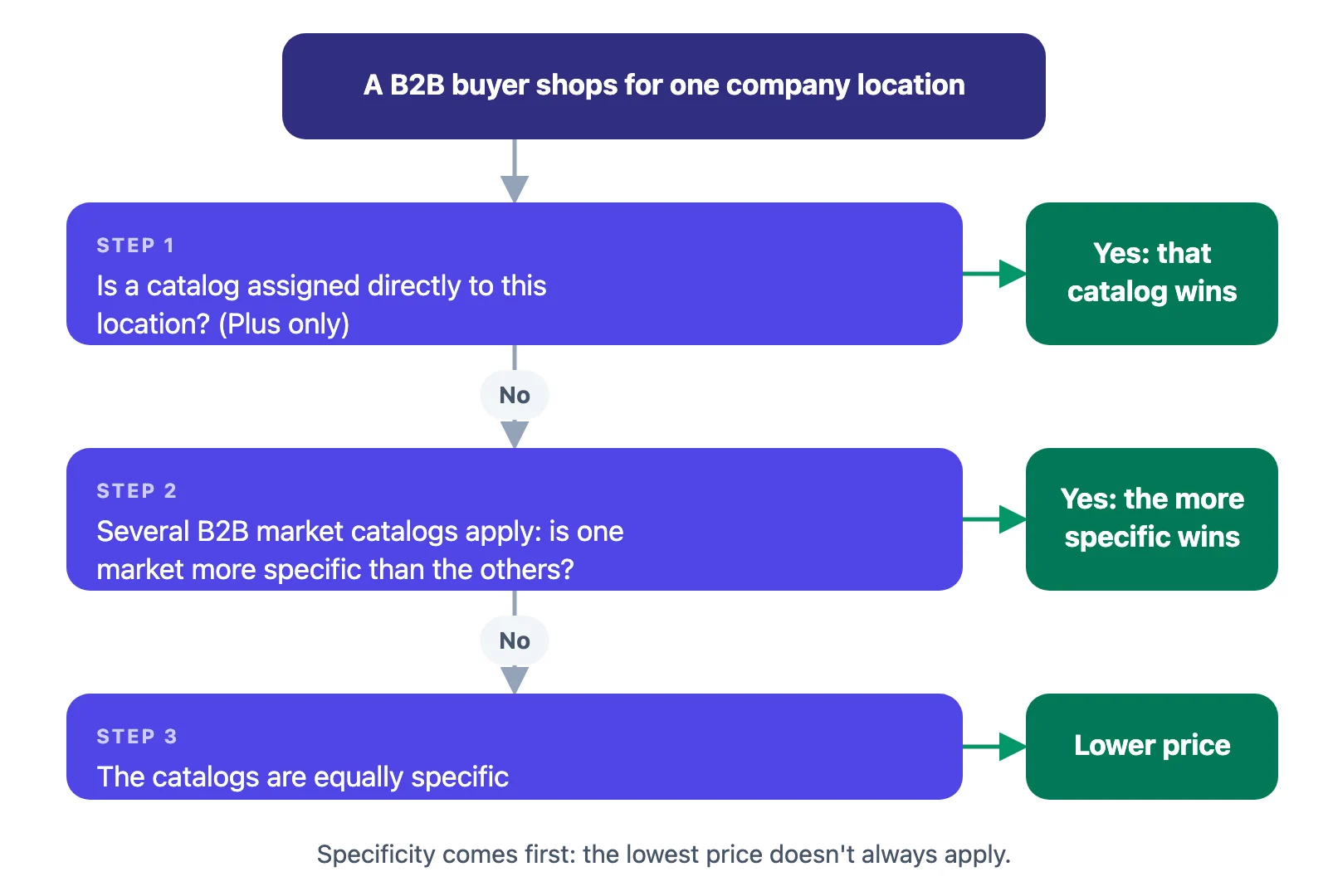
Shopify’s own documentation adds that “the lowest price doesn’t always apply” — the specificity rules come first. If a buyer sees a price you didn’t expect, work down this list before anything else.
The limits that shape your setup
- 3 active catalog assignments across active B2B markets on Basic, Grow and Advanced. A catalog assigned to two active markets counts as two. Plus has no limit.
- 25 catalogs per company location, on every plan.
The 3-assignment cap is the single most important planning constraint below Plus. Three price tiers (“Bronze, Silver, Gold”) fit; a different price list per customer does not. Design your tiers before you build markets.
The full walkthrough, with screenshots of each step, is in B2B catalogs and price lists.
B2B and Shopify Markets
Markets are how Shopify groups buyers so they can get their own currency, catalogs, taxes and storefront settings. For B2B, the condition you want is company locations:
- A market defined by company locations contains exactly the locations you choose (or every location in a country).
- A market defined only by regions includes consumers in those regions too. Assign a wholesale catalog there and retail shoppers in that country may see it.
When you pick specific locations, the region list only filters the location picker — it doesn’t restrict where those locations can ship.
Currency and country follow the location’s shipping address. A wholesale buyer in France is matched to your France-related markets because their location ships to France, not because of anything on their customer profile.
Market-specific storefront and checkout experiences, and theme customisation per market, need Advanced or Plus.
Payment terms and deposits
Payment terms are why wholesale buyers want a B2B account at all. Shopify offers:
| Term | Due | Notes |
|---|---|---|
| No payment terms | at checkout | the default |
| Net 7 / 15 / 30 / 45 / 60 / 90 | that many days after the order is placed (on a draft order, after the issue date set on the draft) | |
| Due on fulfillment | when you fulfill the order | |
| Due on receipt | when the buyer receives the invoice | draft orders only |
| Fixed date | a date you choose | draft orders only |
You can set terms on a company location, on a whole company (applied to all its locations), in bulk from the Companies page, or on an individual draft order.
What actually happens with terms
- Payment is not collected automatically when terms expire. If the buyer saved a card, you still have to charge it yourself. Build a weekly “due and overdue” check into your routine.
- Overdue orders stay payable. After the due date, the order is marked Overdue and the buyer can still pay it from their account.
Deposits (Plus only)
On Plus, a location can require a deposit: a percentage paid at checkout, with the balance due on the location’s terms. Partial payments and payment requests per fulfillment are Plus only as well.
Checkout and draft orders
From sign-in to payment, a self-serve B2B order runs like this:
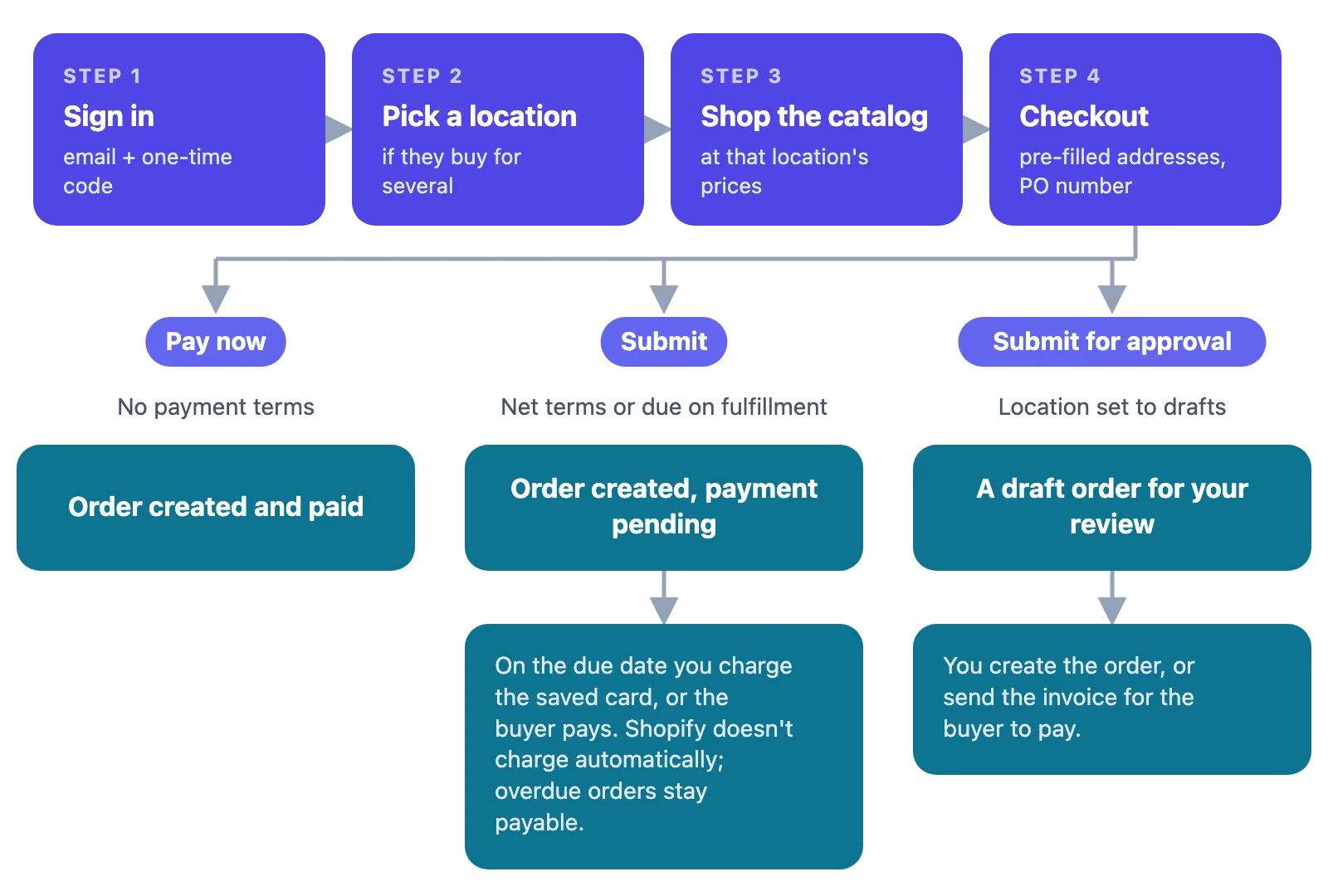
What the buyer sees at checkout
- Addresses are pre-filled and locked to the location’s shipping and billing addresses. A buyer can only use a different ship-to if you turned on editable shipping addresses for that location, and a Location admin can update the location’s addresses from their account before checkout.
- PO numbers can be entered at checkout.
- The button reflects the terms: “Pay now” with no terms, “Submit” with net terms, “Submit for approval” when the location only allows draft orders.
“Submit for approval” (checkout to draft)
If a location’s checkout is set to create draft orders, the buyer’s checkout becomes a request: it creates a draft order for you to review, and turns into a real order only when you create the order or the buyer pays the invoice. Use it when every wholesale order needs a human check — stock, freight, credit.
Draft orders as quotes
Draft orders are the native tool for quotes, phone orders and sales-rep orders: you build the order, set prices and terms, and send an invoice with a checkout link. Two things we verified on test stores matter here:
- A B2B draft ships to a company location. When the draft is tied to a company location, the checkout uses the location’s address, and an address typed onto the draft is replaced. The location’s “Ship to any one-time address” setting doesn’t change that for a draft — in our test the checkout still locked the shipping address. To ship somewhere new, add the address to the company as a new location first.
- Sending an invoice doesn’t reserve stock. Until the buyer pays, the units are still available to everyone else — unless you use Reserve items on the draft and set an expiry.
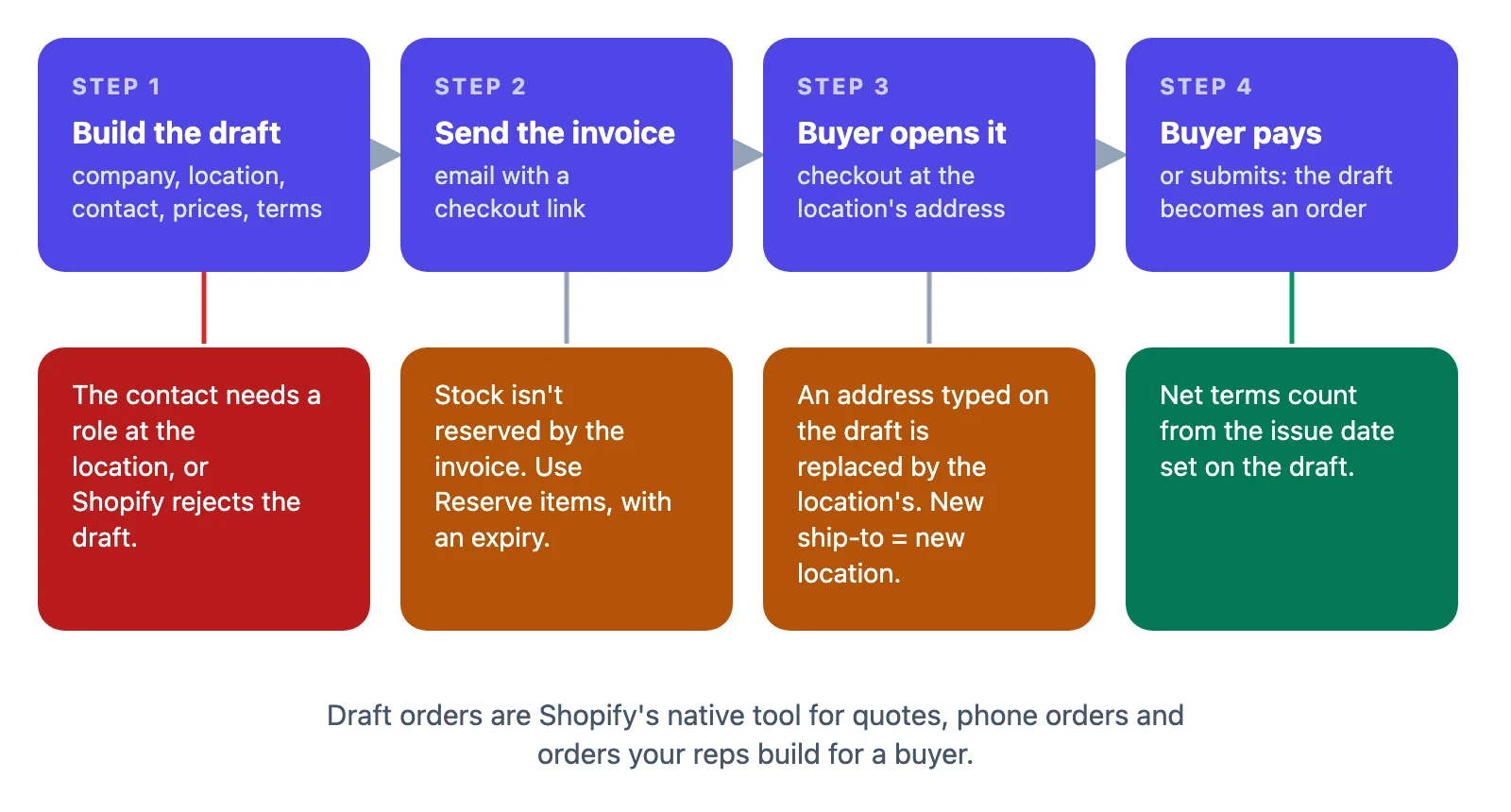
Our guide to draft orders for wholesale quotes covers pricing, reservations and invoicing in detail.
Abandoned-checkout recovery is turned off by default for B2B and is only available on Plus.
Customer accounts and store access
By default your store stays public: anyone can browse, and only signed-in B2B buyers see their wholesale catalog and prices. A dedicated B2B store can be restricted to signed-in B2B customers, but note what that does and doesn’t do:
- Restricting access doesn’t redirect every visitor to a sign-in page.
- When access is restricted, prospective buyers can’t send company account requests.
Keep wholesale-only products out of every consumer catalog, and remember that a consumer market without an active catalog falls back to everything published on the Online Store. Sign-in, contact roles and the restriction are covered in customer accounts and store access.
Sales staff and permissions
On Grow, Advanced and Plus, you can create staff roles for a sales team and assign staff to company locations — up to 10 staff per location. A rep with the “restrict to assigned company locations” permission only sees the companies, customers, orders and draft orders of their own locations.
That restriction covers those four areas only. Analytics, marketing and the Home page are not filtered by location, so leave them out of a sales-rep role. Reps also work inside the Shopify admin, as staff accounts — and your plan may limit how many staff accounts you can have.
What each plan can do
| Feature | Basic | Grow | Advanced | Plus |
|---|---|---|---|---|
| Companies, locations, contacts | ✓ | ✓ | ✓ | ✓ |
| Catalogs via B2B markets | ✓ (3 assignments) | ✓ (3) | ✓ (3) | ✓ (unlimited) |
| Catalogs assigned directly to a company or location | — | — | — | ✓ |
| Quantity rules and volume pricing | ✓ | ✓ | ✓ | ✓ |
| Net terms, draft orders, invoices | ✓ | ✓ | ✓ | ✓ |
| Sales staff permissions | — | ✓ | ✓ | ✓ |
| Market-specific storefront and checkout | — | — | ✓ | ✓ |
| Deposits, partial payments | — | — | — | ✓ |
| Abandoned checkouts for B2B | — | — | — | ✓ |
Where Shopify stops
Shopify B2B is built first for the buyer who orders for themselves. For a field sales team it asks more of you: each rep needs a Shopify staff account and works in the Shopify admin, and commission tracking per rep is not part of B2B — you work it out from orders yourself.
That gap is what we built FieldB2B for. Reps get their own mobile portal and log in without a Shopify staff account. They build orders at each company location’s real B2B prices, quantity rules and terms, and send them as Shopify draft orders with a PDF quote. Commissions are tracked per rep. It reads your Shopify B2B setup instead of replacing it — see how company modes work, how quotes follow company locations, and how a rep creates a quote.
Where to go next
The Shopify B2B Playbook goes deeper on each part of this guide, with every article in reading order:
- Shopify Draft Orders for Wholesale: Quotes, Reserved Stock, and Net Terms
- How to Sell Wholesale on Shopify: A B2B Playbook for Sales Reps
- Shopify B2B Companies, Locations and Contacts: How to Model Your Wholesale Customers
- Shopify B2B Features by Plan: Basic vs Grow vs Advanced vs Plus
- Shopify B2B Payment Terms and Deposits: Net Terms, Due Dates and Getting Paid
- Shopify B2B Catalogs and Price Lists: How Shopify Picks a Price
- Shopify B2B Quantity Rules and Volume Pricing: Minimums, Case Packs and Price Breaks
- Shopify B2B Checkout Settings Explained: Order Approval, Ship-To Addresses and Payment
- International Wholesale with Shopify Markets: Currency, Catalogs and Taxes for B2B
- Shopify B2B Customer Accounts and Store Access: Sign-In, Roles and Restricting Your Store
Frequently asked questions
Do I need Shopify Plus to sell B2B on Shopify? No. Shopify B2B works on the Basic, Grow, Advanced and Plus plans. Plus adds catalogs assigned directly to a company or location, unlimited catalog assignments, deposits and partial payments, but companies, catalogs through B2B markets, quantity rules, volume pricing and net terms work on every eligible plan.
How many price lists can I have below Plus? On Basic, Grow and Advanced you can have up to three active catalog assignments across your active B2B markets, and a catalog assigned to two markets counts twice. Each company location can have up to 25 catalogs on any plan.
Why does a B2B buyer see a different price than I set? Shopify applies catalogs in order: a catalog assigned directly to the location wins, then the most specific market’s catalog, and only when two are equally specific does the lower price win. Check which catalogs reach that location before changing prices.
Does Shopify charge net-terms invoices automatically when they are due? No. Payments are not captured automatically when terms expire. If the buyer saved a card, you charge it yourself; otherwise the order is marked overdue and the buyer can still pay it from their account.
Can a wholesale buyer ship an order to a new address? Only if the location allows editable shipping addresses, or a Location admin updates the location’s addresses before checkout. For a draft order tied to a company location, checkout uses the location’s address even when the location allows one-time addresses, so a new destination should be added to the company as a new location.