Choose which products offer gift wrap
By default, every product offers gift options. Use Rules to limit them, for example to skip gift cards or perishable items.
Set a rule
- In the app, open Rules.
- Under Show gift options for, choose:
- All products (the default),
- Only the selected products, or
- All products except the selected ones.
- For the last two, pick what counts as “selected”. You can combine all three:
- Products: click Select products.
- Collections: click Select collections.
- Product tags: separate tags with commas.
- Save.
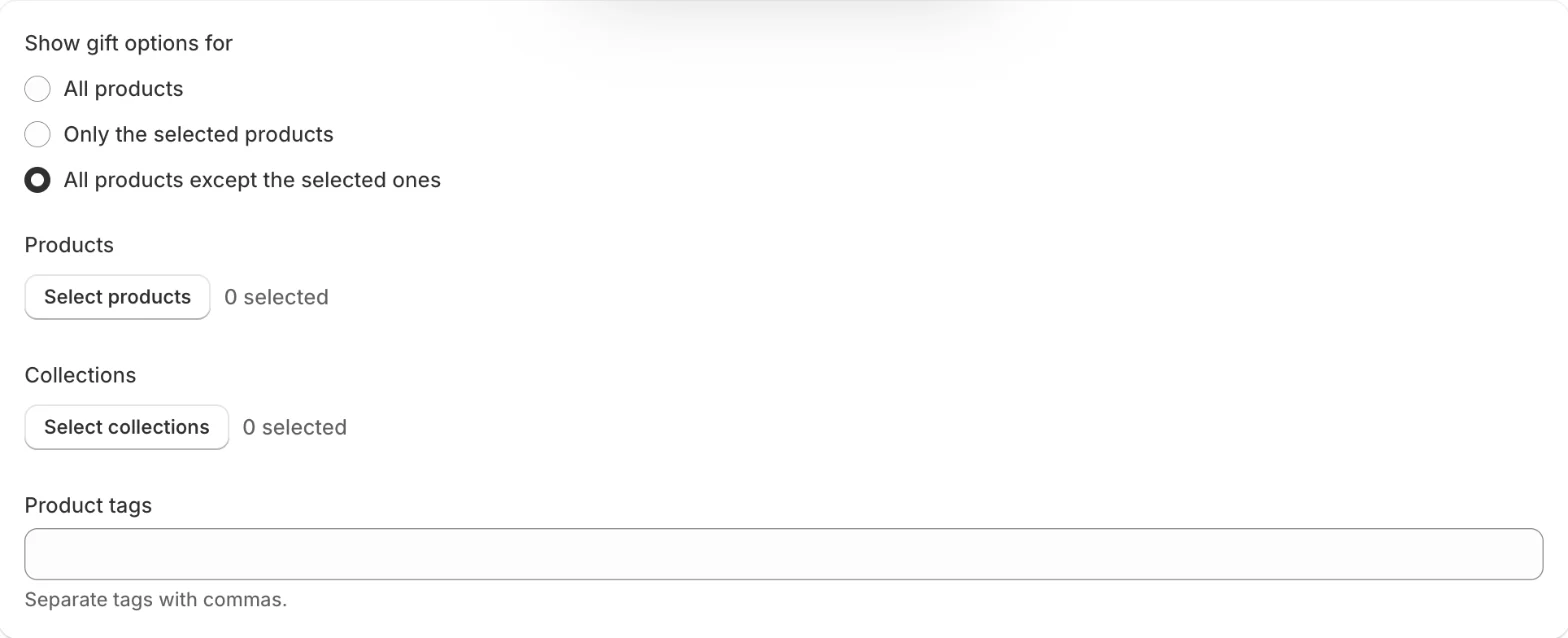
A product counts as selected if you picked it, it is in a picked collection, or it has one of the tags.
Good to know
- Tags must match exactly, including upper and lower case. “Gift” and “gift” are different tags.
- With Only the selected products, choose at least one product, collection or tag, or gift wrap won’t show on any product.
- Products or collections you delete in Shopify drop out of the rule the next time you save.
- Rules apply on product pages and to the single-item list on the cart page. A wrap for the whole order is offered whatever is in the cart.
Related
Related articles
- Create a wrap optionAdd a wrap option from the gift box template or from scratch, set its name, price and image, and duplicate, reorder or delete options.
- Offer wrap choicesLet shoppers pick the paper, colour or occasion inside one wrap option, with pictures or colour swatches, at the same price.
- Install the app and set up gift wrapCreate your first wrap option, turn on the app embed in your theme and check gift options on your store, following the setup guide on Home.