Find duplicate SKUs and barcodes
When two variants share a barcode, a scan can’t tell them apart. The duplicates report finds those clashes across your whole catalog.
Read the report
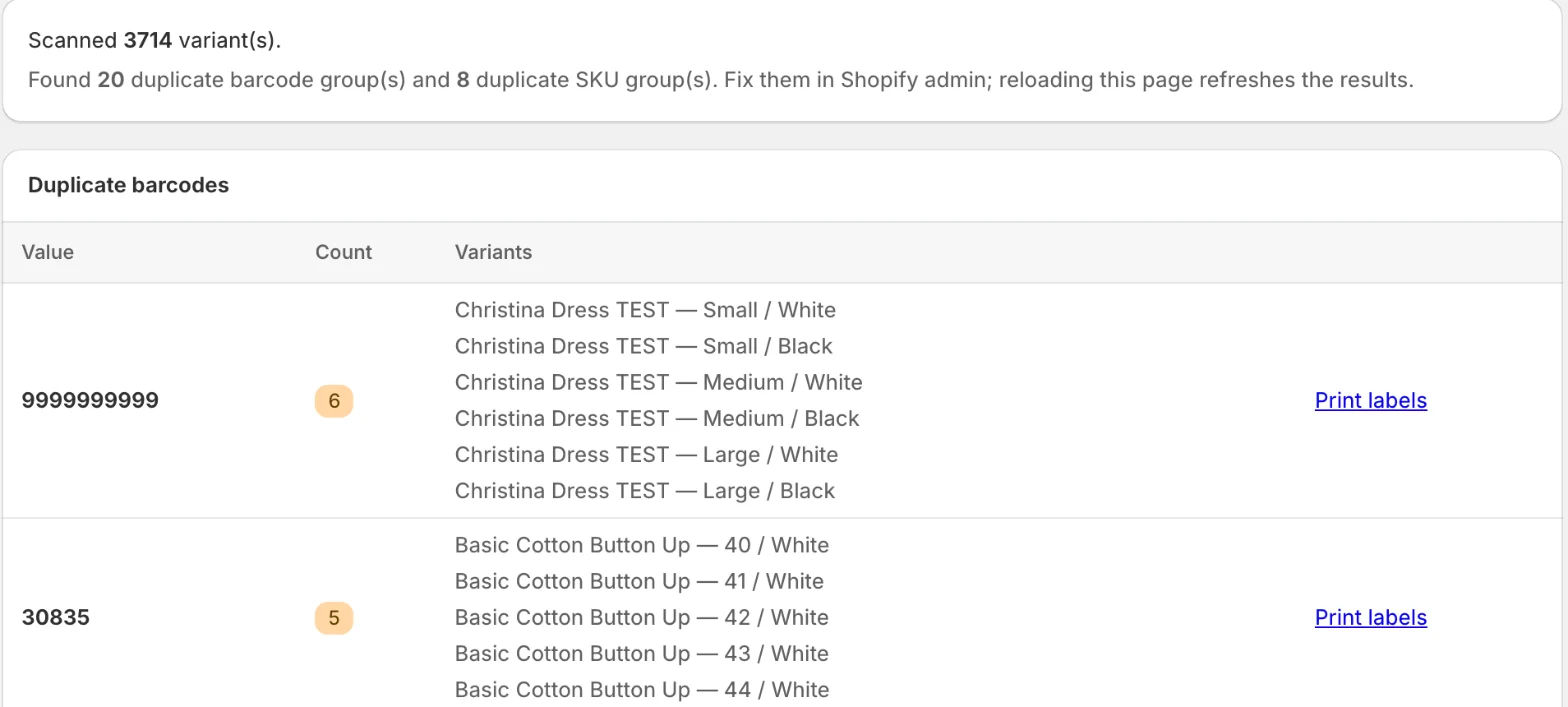
Open Barcode Labels → Duplicates. The app checks every variant and shows how many it scanned and how many duplicate groups it found. Duplicate barcodes and Duplicate SKUs list each shared Value, its Count and the Variants that use it.
A clean catalog shows ✓ No duplicate barcodes or SKUs found.
Fix duplicates
Change the values on the product in Shopify admin, or replace them in bulk with a CSV import. Reload the report to check again. Print labels on a group opens the print page with its variants already chosen, so you can relabel them after the fix.
Related
Related articles
- Import SKUs or barcodes from a CSVDownload your variants as a CSV, fill in the new SKUs or barcodes, upload the file, check the preview and apply. Up to 2,500 rows per file.
- Generate missing SKUsSet a SKU rule with a prefix, separator and counter, preview it, then fill every empty SKU or only the variants you pick. Each run can be undone.
- Generate missing barcodesCreate valid GTIN-13, GTIN-12 or GTIN-8 barcodes for variants that have none, with your GS1 company prefix, a live preview and per-run undo.