Only allow products in the company's catalogs
In Shopify B2B, each company location has catalogs that decide which products it can buy. The rep portal shows your whole store, so a rep can add a product the location’s catalogs don’t include and quote it at a fallback price. This setting marks those products and keeps them out of carts and quotes. It’s off until you turn it on, and it’s only available in Shopify B2B mode.
Turn it on
- In the app, open Settings. Under Company catalogs, tick Only allow products in the company’s catalogs and click Save.
- Shopify asks you to let FieldB2B read your publications. Approve it.
The section then says Permission to read publications granted — catalog membership is checked.
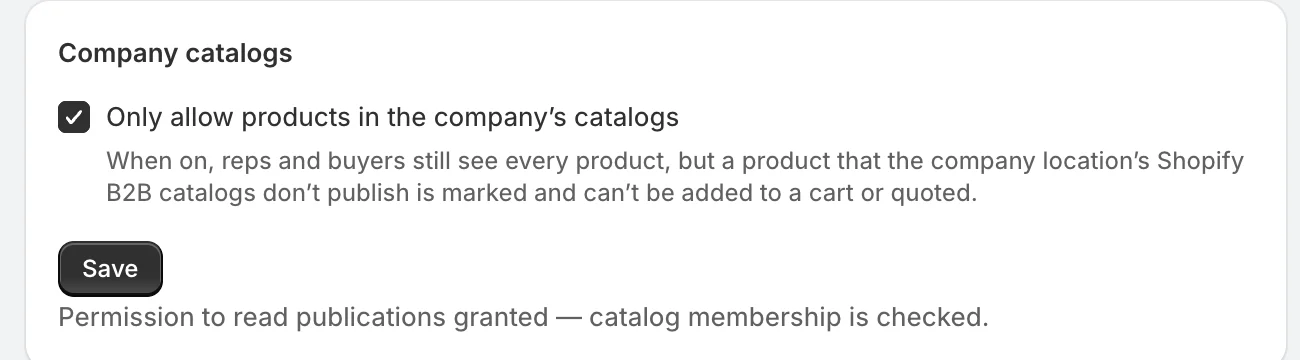
If you saved the setting but didn’t approve, it says Permission needed: until you grant access to read publications, catalog membership can’t be checked and every product stays orderable. Click Grant permission.
What reps and buyers see
Reps and buyers still see every product. A product the location’s catalogs don’t include is marked Not in this company’s catalog on its card, its product page and in the variant picker, and its add button is disabled.
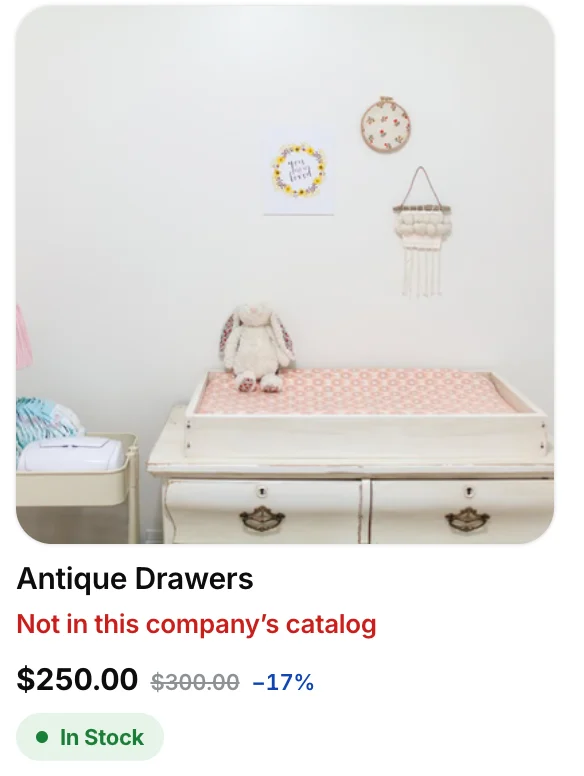
- In Quick Order, such a line is marked and not added.
- A line already in the cart is marked, and its quantity can be lowered but not raised.
- Creating a quote with such a line is refused: Only products in this company’s catalog can be ordered.
The check is per company location. When the app can’t tell whether a product is in the catalogs (permission not granted, or Shopify doesn’t answer), it lets the product through rather than blocking it.
Related
Related articles
- Add payment terms to draft ordersPut a company location's Shopify payment terms, such as Net 30, on the draft order behind every quote, and show them on the quote, PDF and email.
- Choose a company mode: Shopify B2B sync or app-managedDecide whether FieldB2B reads your B2B companies from Shopify B2B or manages them in the app, and what each mode syncs.
- Show metafields on the product pageShow facts you keep in Shopify metafields, like when a sold-out size is back, on the product page your reps and buyers see.